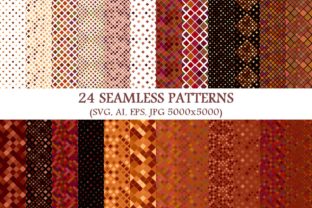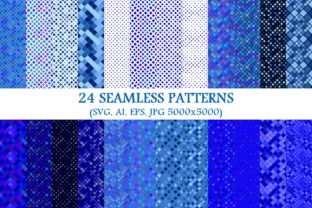
24 Seamless Blue Square Patterns
Blue is calm, confident, and universally trusted — and when it’s built into 24 seamless blue square patterns, it becomes more than color: it’s structure, rhythm, and quiet versatility. This collection isn’t just a set of backgrounds — it’s a toolkit designed for clarity and consistency across real-world creative work. Each pattern repeats flawlessly, whether scaled to a business card or stretched across a billboard. And with 24 seamless blue diagonal square pattern backgrounds included, you gain directional energy without sacrificing cohesion.
The package delivers 96 total files — 24 vector SVG, 24 vector AI, 24 vector EPS, and 24 high-resolution JPGs (5000×5000 px). That means full editing freedom in Illustrator or Figma, pixel-perfect use in Canva or Photoshop, and reliable embedding in web projects or print layouts. No rasterization surprises. No scaling artifacts. Just clean, adaptable geometry rooted in blue.
Why Seamless Square Patterns Still Matter
In a world of fleeting trends and overdesigned interfaces, square-based seamless patterns offer something rare: visual stability. They align naturally with grids used in web design, UI wireframing, presentation templates, and even physical product mockups. Unlike organic or irregular textures, these patterns support hierarchy — they recede respectfully behind text, icons, or photography without competing for attention.
The blue tone here isn’t arbitrary. It’s calibrated for legibility on screen and warmth in print — deep enough to feel intentional, light enough to avoid heaviness. Whether you’re building a brand identity for a wellness startup or designing lesson slides for middle-school science, this blue supports your message instead of overshadowing it.
Creative Uses Across Roles
Designers use the SVG and AI files to build custom dashboards, app UI kits, or branded slide decks. Try layering a subtle diagonal square pattern beneath a semi-transparent content panel — it adds depth without clutter. For client presentations, swap out default gray backgrounds with one of the lighter blue variants to signal professionalism and approachability.
Bloggers and content creators apply the JPGs as blog post headers, Pinterest pins, or email newsletter banners. Because each is 5000×5000 px, you can crop tightly for social thumbnails or stretch wide for hero sections — all while keeping sharp edges and consistent tone. Pair a medium-intensity pattern with crisp white body text for long-form readability.
Educators and trainers integrate these into worksheets, digital handouts, or LMS course modules. A soft blue square grid makes timelines, reflection prompts, or vocabulary tables feel organized — not sterile. Use the diagonal versions for “process” visuals (e.g., step-by-step infographics) where directionality reinforces sequence.
Small business owners apply them directly to packaging mockups, Shopify store banners, or printed business cards. Since the vectors scale infinitely, you can test how a pattern reads at 2×2 inches (a sticker) versus 24×36 inches (a trade show backdrop) — same file, no redesign needed.
Real Projects, Real Adaptations
- A freelance copywriter uses the lightest diagonal pattern as a textured background for her portfolio homepage — then overlays her headline in bold sans-serif. The result feels grounded, not generic.
- A university communications team applies one of the denser square patterns to a PDF report cover. When converted to grayscale for internal printing, the geometry still reads clearly — no loss of structure.
- An indie jewelry maker inserts a cropped section of a mid-tone diagonal pattern into her Instagram Story template. It frames product photos consistently across campaigns, reinforcing visual recognition without logos.
- A nonprofit builds a recurring webinar series around color-coded themes — blue for “strategy,” green for “impact,” etc. With 24 seamless blue square patterns, they maintain tonal unity across slides, registration pages, and follow-up emails.
Keeping It Clear, Consistent, and Audience-Friendly
Patterns work best when they serve — not distract. Start simple: pick one base pattern per project and vary only its opacity, scale, or placement. For digital use, keep JPGs under 800 KB by exporting with moderate compression; vectors stay lightweight by nature. In branding, treat the blue as part of your palette — not a replacement for your primary brand color — unless consistency *is* the goal (e.g., a blue-focused sustainability campaign).
To avoid visual fatigue, pair these patterns with ample whitespace and strong typographic contrast. If using on dark mode interfaces, test the lighter blue variants against #121212 or #1E1E1E backgrounds — many hold up well, but preview before finalizing.
Getting Started Without Overthinking
You don’t need to master every file format upfront. Begin with what fits your workflow:
- Quick edits? Open an SVG in Figma or Illustrator and adjust stroke width or spacing using the pattern’s native tiling controls.
- Web use? Drop an SVG directly into HTML background CSS — it loads fast and scales crisply on any device.
- Print-ready? Use the EPS or AI files in InDesign or Affinity Publisher. Embed, don’t link, to prevent font or path issues during output.
- Social media or blogs? Grab the matching JPG — no conversion needed. Crop to 16:9 for YouTube thumbnails or 4:5 for Instagram posts.
If you’re evaluating whether 24 seamless blue square patterns fits your needs, ask: Do I regularly create assets that benefit from subtle, repeatable structure? Do I value files that work across tools, sizes, and outputs — without rework? If yes, this collection removes friction, not inspiration.
It won’t replace thoughtful typography or smart information design. But it will give your work a dependable foundation — one that’s calm, capable, and quietly confident. And sometimes, the most useful creative tools aren’t flashy. They’re the ones you reach for again, because they simply work.