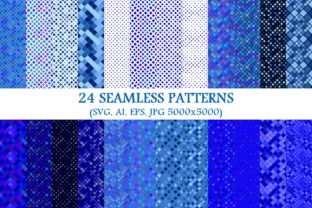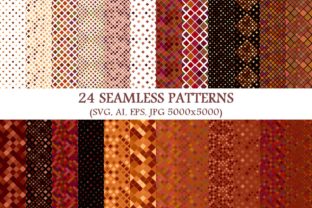
24 Seamless Brown Square Patterns
If you’ve ever spent 20 minutes trying to tile a background without visible seams—or worse, watched your design fall apart at the edges when scaled—you know how much time a truly seamless pattern can save. The 24 Seamless Brown Square Patterns package isn’t just another collection of generic textures. It’s a thoughtfully built toolkit for designers, marketers, crafters, and small business owners who need warmth, consistency, and quiet sophistication—without reinventing the wheel.
What Exactly Is This Package?
At its core, it’s a set of 24 distinct brown square patterns—each designed to repeat flawlessly in any direction. But what makes it unusually versatile is how it’s delivered: 24 vector SVG files, 24 vector AI files, 24 vector EPS files, and 24 high-res JPGs (5000×5000 pixels). That means whether you’re editing in Figma, Illustrator, Canva, Photoshop, or even cutting vinyl on a Cricut, there’s a format that works—no pixelation, no scaling limits, no guesswork.
The “brown” here isn’t monolithic. You’ll find warm taupe squares with subtle grain, deep chocolate grids with soft shadowing, matte espresso checks, sandy beige tessellations, and even muted terracotta-influenced variants—all grounded in real-world brown palettes that pair naturally with wood tones, cream paper, charcoal text, and natural fiber photography.
Where These Patterns Actually Shine (Beyond “Just Backgrounds”)
Design assets often get pigeonholed as “backgrounds only”—but these 24 Seamless Brown Square Patterns quietly solve problems across surprisingly diverse situations.
- Product Packaging Mockups: E-commerce sellers use them to build realistic flat-lay scenes—think coffee bags wrapped in kraft paper over a rich brown grid, or artisan soap labels resting on a softly textured square backdrop. The 5000×5000 JPGs hold up crisply even when zoomed in for Amazon or Etsy thumbnails.
- Branding Consistency for Small Businesses: A local bakery, interior stylist, or leather goods maker doesn’t always need bold logos—sometimes cohesion comes from repetition. One of these patterns becomes the subtle border on business cards, the repeating motif in email headers, or the texture behind a minimalist Instagram story highlight cover. Because they’re vectors, you can recolor them in seconds to match existing brand hex codes.
- Print-on-Demand & Surface Design: Artists uploading to Redbubble, Spoonflower, or Printful benefit from the SVG and EPS files—they scale infinitely for fabric repeats, notebook covers, or ceramic decals. Unlike raster-only packs, you won’t hit resolution walls when adapting a 2-inch swatch into a 36-inch wall mural.
- Web & UI Texture Layers: Modern web design leans into tactile depth—not glossy gradients, but grounded, haptic-feeling layers. Dropping one of these patterns as a subtle
background-image(with low opacity) under a light-colored section adds dimension without competing with content. Bonus: SVGs load faster than large JPGs and remain crisp on Retina displays. - Physical Craft & DIY Projects: Laser cutters and CNC machines read vector files natively. Hobbyists use the AI or EPS versions to create engraved coasters, inlaid wooden trays, or embossed leather journal covers—where precise, repeatable geometry matters more than artistic flair.
Who Uses These—and How Their Needs Differ
A freelance graphic designer might open the AI files to drop a pattern into a client’s brand guideline PDF—adjusting stroke weight and spacing to align with their typography hierarchy. A teacher creating printable classroom resources may prefer the JPGs: drag-and-drop simplicity into Google Slides or Canva, no software license required. A wedding stationery designer could isolate one SVG square, rotate it 45°, and layer it beneath vellum overlays for an elegant diagonal effect—leveraging the companion 24 seamless brown diagonal square pattern backgrounds included in the same package.
Even non-designers find value. Real estate agents use the neutral brown grids as clean, unobtrusive backdrops for property feature videos—no distracting florals or busy motifs pulling focus from the home itself. Podcasters repurpose them as consistent thumbnail backgrounds across seasons, reinforcing visual recognition without needing custom illustration each time.
Things to Keep in Mind Before You Use Them
Seamless doesn’t mean invisible—context still matters. A tightly spaced, high-contrast brown checkerboard might feel too structured behind dense body copy; a softer, lower-contrast version often breathes better in editorial layouts. Likewise, while all 24 are technically “brown,” some lean cooler (ashy greige), others warmer (reddish clay)—so test them against your primary photos or product shots before committing.
You’ll also want to consider output medium. For screen-only use, SVGs give you maximum flexibility and performance. For print jobs requiring CMYK separation or spot color matching, the EPS files retain embedded color profiles more reliably than JPGs. And if you’re handing files to a third-party printer unfamiliar with vectors, the 5000×5000 JPGs serve as foolproof fallbacks—just confirm they’re embedded at 300 DPI in your layout software.
One gentle limitation: these are square-based repeats, not organic or hand-drawn textures. If you need the irregularity of watercolor bleed or chalky imperfection, this pack won’t deliver that. But if you value precision, scalability, and quiet elegance—especially in brown tones that avoid both sterility and heaviness—that’s exactly where it excels.
Why “24” Matters More Than You’d Think
It’s not about quantity for quantity’s sake. Having 24 options means you can match tone to intention: a fine-lined, minimal grid for tech or finance branding; a bolder, chunkier square for children’s education materials; a softly blurred variant for wellness or spa-related visuals. You’re not stuck choosing between “too busy” and “too plain.” You land somewhere intentional—because variety here supports decision-making, not overwhelm.
And because every file is named clearly (e.g., BrownSquare_07_SoftTaupe_LowContrast.ai), you’re not hunting through unlabeled thumbnails at 11 p.m. before a client deadline. That small detail—thoughtful naming, consistent formatting, cross-software compatibility—turns what could be a quick download into a long-term workflow ally.
Real Moments Where These Made a Difference
A ceramicist used the diagonal SVG version to etch a repeating lattice onto porcelain mugs—scaling the same file from 2 cm to 12 cm without distortion. A nonprofit redesigned their donor newsletter using one of the warmer brown patterns as a header band—softening the formality of financial reporting while keeping it trustworthy. An indie game developer dropped a subtly animated version (converted from SVG) into a café-themed UI scene, giving static menus a grounded, lived-in feel.
None of those uses were in the product description. They emerged from people noticing what the patterns *allowed*: reliability, warmth, and room to adapt—without demanding attention.